 Proxyshot
The control you need. Camera, timing and position for AI video.
AI video models like Seedance create stunning shots from a prompt, a first frame or a few reference images. But some shots have to be exact – the camera sweeping in at just the right moment, a man slipping between two cars just in time, a camera move copied 1:1 from a reference. Describing that in words and hoping is not enough.
Proxyshot puts you back in the director's chair. Build the shot as a simple 3D blockout in a dialog with Claude, check camera and timing in a live preview, then export a driver video with a matching Seedance prompt. You direct camera, timing and position – the model brings the look.
One continuous 10-second take: a man pushes through the crowd, slips between moving cars and stops in the middle of the road while the camera circles him. Left the Proxyshot driver, right Seedance 2.5 Reference rendered from that driver and the generated prompt – draft quality, no edits. Drag to compare.
How it works
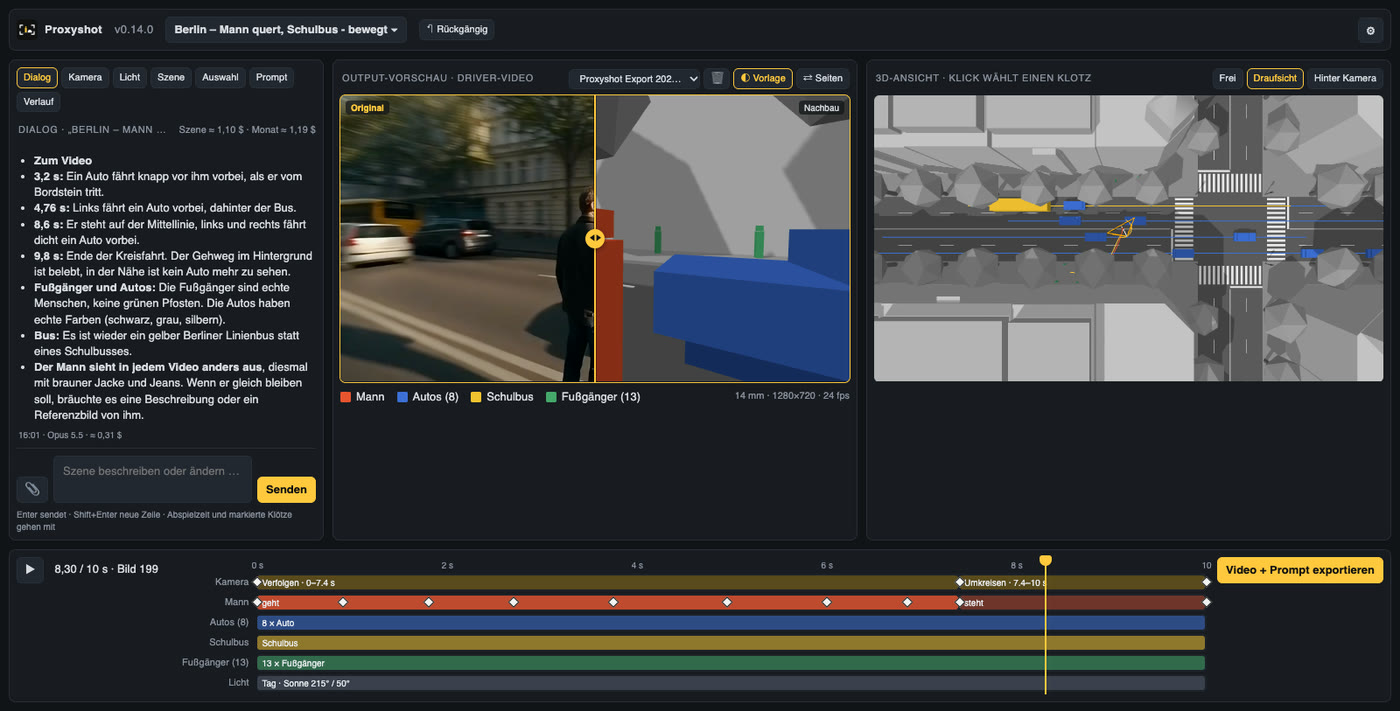
What Proxyshot does
- Scenes from a sentence – describe it, Claude builds the blockout and asks when something conflicts.
- Real camera language – tracking shots, orbits, free camera paths, focal length, height and roll.
- Copy a camera move from a reference video and check it 1:1 with the overlay slider.
- Timing you can see – timeline with keyframes and frame-accurate scrubbing.
- Driver and prompt in one click – coloured blocks are labels, not looks.
- You decide what Seedance may add – nothing, background only, or free.
- Whole seconds at 24 fps – exactly what Seedance generates, so results line up frame by frame.
- Every scene keeps its history – references, results, versions and the conversation.
Your Claude, your costs
- Bring your own Claude API key – usage is billed by Anthropic directly to you.
- Typically a few cents per change – Proxyshot shows the cost of every answer, per scene and per month.
- Choose the model – Claude Opus by default, faster or stronger models when you need them.
- A specialised assistant – trained on blockouts, camera moves and Seedance, and it learns along the way.
Pricing
- Up to 3 scenes
- 5 driver exports per month
- Full dialog with Claude
- Your own Claude API key
- Unlimited scenes and exports
- Reference video matching
- Overlay slider and result library
- Versions, history and cost tracking
- Your own Claude API key
- Everything in Pro
- White label – your brand, your domain
- Custom templates, assets and scene libraries
- Team workspaces, onboarding and training
- Custom features and pipeline integrations
- Dedicated support
All plans run on your own Claude API key. Claude usage is billed by Anthropic directly to you – typically a few cents per change – and Proxyshot shows the cost of every answer.